Start with your voice
Record a song, a story, or a funny sound. A grown-up helps choose the microphone and press Record.
 BANDERA STUDIOMusic. Family. Good ideas.Find your board
 JERRICK’S MIXING BOARD
Sing something. Play something.
Make something together.
A colorful mixing board for small music makers and their grown-ups. Move a fader, try an effect, add a beat, and hear your idea turn into a song.
Start with a grown-up · Use gentle headphone volume
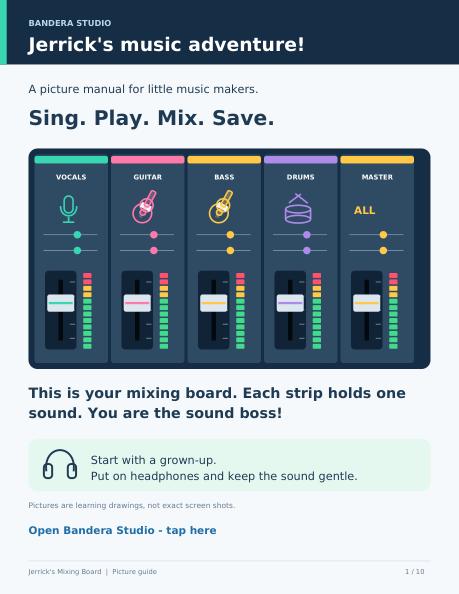
A learning picture of the board. Open the studio to try the real controls.
LEARN THROUGH PLAY
Record a song, a story, or a funny sound. A grown-up helps choose the microphone and press Record.
Try a guitar sound, warm up a bass, or add a little chorus and reverb. Press Play Mix to hear what changed.
Build country drums, a rock beat, a shuffle or a click track. Match recorded guitar and bass, then adjust together.
A GROWN-UP AND A LITTLE CREATOR
Let the little musician try one control at a time. Listen together and keep the sound comfortable.
A grown-up connects the microphone. Choose a track for your voice or instrument.
Turn on Record for the track, press the big Record button, then Stop when you’re done.
Listen back, try a colorful fader, and let a grown-up save your song so you can hear it again.
A GUIDE FOR LITTLE HANDS
Jerrick’s Windows ZIP includes his EXE, the colorful child’s picture manual, and Start Here instructions.
Windows x64 online launcher: internet required. Unsigned beta; Windows testing is pending. A grown-up should help with setup and downloads.
FOR THE GROWN-UPS
Connect the mic or interface, allow microphone access, choose the correct input, manage listening volume, and save the files. Children can explore the faders and sounds alongside you.
The board works in compatible browsers. Use Safari on iPhone or Chrome on Android for recording. USB interfaces may need adapters and power. Keep the app open while recording.
Save Song keeps an editable .bandera file with the tracks and settings. Open Song restores it. Download Mix creates a WAV listening copy. Keep your own backup.
Jerrick’s board begins with four tracks, simpler controls and a child’s picture guide. Ray’s board starts with six tracks plus MASTER and offers more effects, input controls and longer takes.
BRING YOUR GROWN-UP. BRING YOUR IDEAS.